Introduction
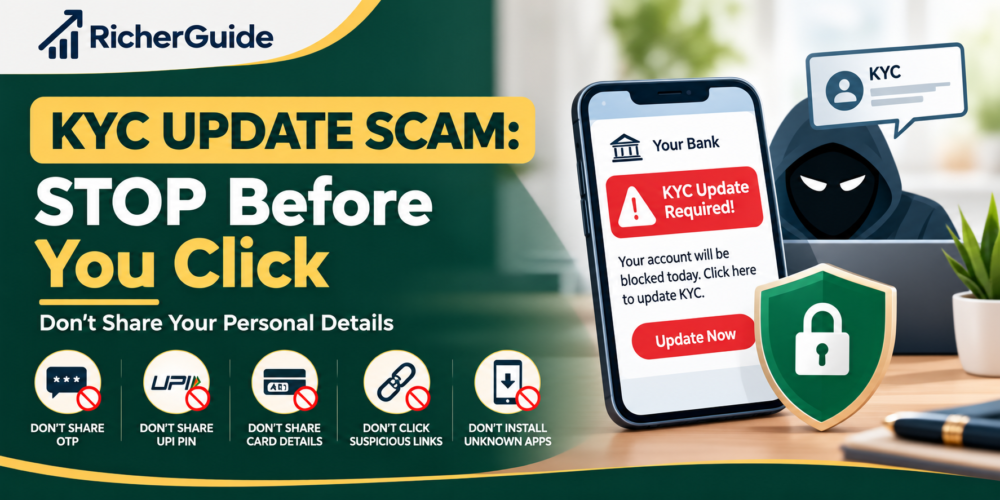
KYC (Know Your Customer) helps banks verify customer identity. However, scammers use fake SMS, calls, emails, and WhatsApp messages to trick people into sharing personal and banking details. They may threaten to block your bank account if you do not update your KYC immediately. Fake links can steal your Aadhaar, PAN, OTP, UPI PIN, or banking password. Always verify KYC requests through official channels and never share sensitive banking details with strangers.
In this article, RicherGuide explains how KYC update scams work, how to identify them, and what to do if you become a victim.
Remember: Never panic, never share sensitive banking details with strangers, and always verify before you act.
A Complete Guide to Fake KYC Calls, SMS, WhatsApp Messages, Links and Apps in India
Important: Never share your OTP, UPI PIN, ATM PIN, card CVV, internet banking password or other sensitive banking credentials with someone who contacts you unexpectedly claiming that your KYC needs to be updated.
Table of Contents
KYC means Know Your Customer. Banks, financial institutions and other regulated entities use KYC information to verify the identity and address of their customers.
KYC is a normal and important part of banking.
The problem starts when criminals misuse the word “KYC” to create fear.
You may receive an SMS saying:
“Your KYC has expired. Your bank account will be blocked today.”
Or a caller may say:
“Your KYC is incomplete. Click this link immediately to avoid account suspension.”
You may even receive a WhatsApp message containing a link to a website that looks similar to your bank’s website.
The scammer may ask for your:
- PAN details
- Aadhaar-related information
- Date of birth
- Bank account details
- Debit or credit card details
- CVV
- OTP
- UPI PIN
- Internet banking password
- Screen-sharing access
- Mobile banking login details
- A photograph or scan of an identity document
The objective is usually not simply to “update your KYC”.
The objective is to steal information, obtain access to your account or trick you into authorising a transaction.
The Reserve Bank of India has updated its KYC directions and requires regulated entities to provide customers with advance communications about periodic KYC updation. RBI’s 2025 amendment says regulated entities should provide at least three advance intimations before the due date and reminders afterward for customers who have not completed the required updation.
That makes one point especially important:
A genuine KYC requirement does not mean every KYC message, phone call or link you receive is genuine.
This article explains how KYC scams work, how to identify them, what information you should never share, and what to do if you have already been targeted.
What Is a KYC Update Scam?
A KYC update scam is a type of social-engineering fraud in which criminals pretend to be representatives of a bank, financial institution, payment service or government-related organisation.
They create a false emergency around your KYC status.
The scammer may claim:
- Your KYC has expired.
- Your account will be blocked.
- Your debit card will stop working.
- Your UPI service will be suspended.
- Your bank account will be frozen.
- Your PAN will be deactivated.
- Your mobile number will be disconnected.
- Your account will be closed.
- You must update KYC immediately.
The scammer then provides instructions.
For example:
Click this link → enter your details → enter OTP → install an app → share your screen → make a small verification payment.
This is where the scam becomes dangerous.
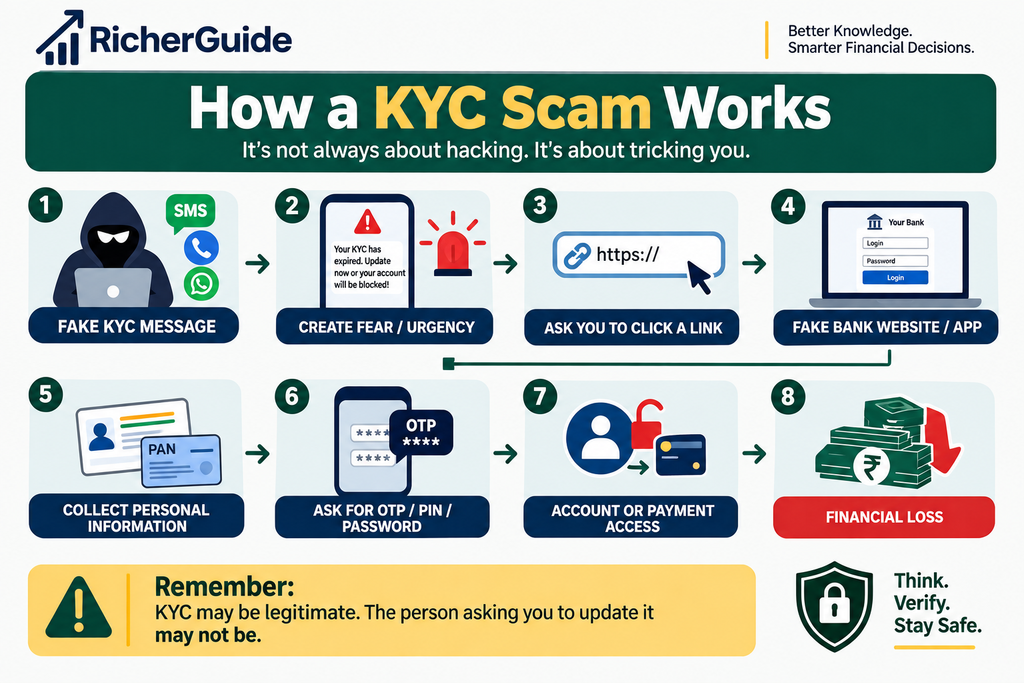
The basic scam model
Why Do KYC Scams Work?
Scammers understand human behaviour.
When someone receives a message saying:
“Your bank account will be blocked within 24 hours.”
many people immediately become worried.
They do not stop to verify the message.
The scammer uses three powerful psychological tricks:
Fear
“You will lose access to your bank account.”
Urgency
“Complete KYC within 30 minutes.”
Authority
“I am calling from your bank’s KYC department.”
These techniques are examples of social engineering.
The scammer does not necessarily need to hack your bank.
Instead, they try to manipulate you into giving them the information or access they need.
NPCI’s fraud-awareness guidance also warns that fraudsters use social-engineering techniques and that fear, greed and ignorance can contribute to people falling for digital-payment scams.
How KYC Scammers Operate -Step by Step
Step 1: They obtain your phone number
Scammers can obtain phone numbers through many sources, including leaked databases, online forms, marketing lists, social media or other data sources.
You may not know how they obtained your number.
Step 2: They send a convincing message
The message may look professional.
For example:
“Dear Customer, your KYC is pending. Failure to update KYC will result in suspension of your account. Update now.”
The message may contain:
- Bank name
- Logo
- Customer-care style language
- Urgent deadline
- A clickable link
The presence of a bank logo does not prove that the message is genuine.
Step 3: They create urgency
This is one of the biggest warning signs.
The scammer may say:
“Complete this within 30 minutes.”
or
“Your account will be frozen today.”
The purpose is to stop you from thinking carefully.
Step 4: They send a fake link
The link may lead to a website designed to look like your bank’s website.
It may contain:
- Bank colours
- Bank logo
- Login page
- KYC form
- Customer-care number
- Security warnings
- Fake verification screens
But the website may be controlled by the scammer.
Step 5: They collect your personal information
The fake KYC form may ask for:
- Name
- Mobile number
- PAN
- Date of birth
- Account number
- Card number
- CVV
- Internet banking username
- Password
- OTP
Never assume that a form is safe simply because it says “KYC”.
Step 6: They request an OTP
This is a critical moment.
The scammer may say:
“You will receive an OTP. Please tell me the OTP so I can complete your KYC.”
Stop immediately.
An OTP is often used to authenticate an action.
Sharing it with another person can allow that person to complete a transaction or authentication process.
Step 7: They may ask you to install an app
Some scams involve remote-access or screen-sharing applications.
The scammer may say:
“Install this application. I will help you complete KYC.”
Once remote access is granted, criminals may be able to observe information displayed on your device or manipulate actions depending on the permissions granted.
Do not install an unknown application because someone calling you asked you to.
Step 8: They may ask you to make a payment
Another trick is:
“Pay ₹1 to verify your bank account.”
or
“Send ₹10 for KYC activation.”
This can be used to move the victim into a fraudulent payment flow.
NPCI specifically warns that QR codes and UPI PINs are used for making payments, not for receiving money or cashback.
Real-Life Example: How a KYC Scam Can Happen
Consider this fictional example.
Scenario: Rahul receives a KYC message
Rahul has a savings account with a bank.
One afternoon, he receives an SMS:
“Your KYC is incomplete. Your account will be suspended today. Click here to update KYC.”
Rahul becomes nervous.
He clicks the link.
The website looks similar to his bank’s website.
It asks for:
Name → Mobile Number → Account Number → Debit Card Number → CVV
Rahul enters the information.
The website then says:
“OTP sent to your registered mobile number.”
A few seconds later, Rahul receives an OTP.
A person calling him says:
“Sir, I am from the KYC department. Please tell me the OTP to complete verification.”
Rahul shares it.
The criminal now has enough information to attempt fraudulent activity.
What should Rahul have done?
He should have:
- Not clicked the link.
- Not called the number provided in the message.
- Opened his bank’s official mobile app or website independently.
- Checked whether a KYC update was actually required.
- Contacted the bank using its official customer-care channel.
- Never shared an OTP, PIN or password.
The important lesson
Do not verify the message using the contact information provided by the suspicious message itself.
Verify independently.
Common Types of KYC Scams
KYC scams can appear in several forms.
| Scam Type | How It Works | Main Risk |
|---|---|---|
| Fake KYC SMS | Message contains a suspicious link | Data theft |
| KYC phone call | Caller pretends to be bank employee | OTP/PIN theft |
| WhatsApp KYC scam | Fake employee sends a form/link | Personal-data theft |
| Fake KYC website | Website copies bank design | Login/data theft |
| Fake KYC app | Victim is asked to install an app | Device/remote-access risk |
| Video KYC scam | Criminal pretends to conduct verification | Identity/data theft |
| KYC payment scam | Victim is asked to pay a small amount | Financial loss |
| SIM/KYC scam | Criminal claims mobile KYC problem | SIM/account compromise |
| PAN/KYC scam | PAN verification is used as a reason | Identity theft |
Warning Signs to Watch For
You should become suspicious when a person or message combines KYC + urgency + sensitive information.
1: “Update immediately”
Words such as:
- Immediately
- Urgent
- Last warning
- Final notice
- Within 30 minutes
- Account blocked today
are designed to create panic.
2: Suspicious links
Be careful with links received through:
- SMS
- Telegram
- Social media messages
Do not click simply because the message contains your bank’s name.
3: Requests for OTP
A stranger asking for your OTP is a major red flag.
Never share your OTP with a caller claiming to be from your bank.
4: Requests for UPI PIN
Your UPI PIN is not something you should share with another person.
NPCI’s fraud-awareness guidance highlights that UPI PIN entry is associated with making payments, not receiving money.
5: Requests for CVV
A KYC caller asking for your card’s CVV should immediately make you suspicious.
6: Unknown app installation
Be extremely careful if someone says:
“Download this app so I can help you update KYC.”
Do not give an unknown person remote access to your phone.
7: Caller asks you to move money
If someone says:
“Transfer your money to a safe account.”
Stop.
This is a common social-engineering technique.
Your bank should not require you to transfer money to a stranger’s account for “security verification”.
What Information Should You Never Share?
Create a simple rule for yourself:
This includes:
❌ OTP
❌ UPI PIN
❌ ATM PIN
❌ Debit card PIN
❌ Credit card PIN
❌ CVV
❌ Internet banking password
❌ Mobile banking password
❌ Login credentials
❌ Screen-sharing access
❌ Remote-access permissions
Be particularly careful when a stranger combines a request for personal information with an urgent deadline.
What About Aadhaar and PAN?
Aadhaar and PAN are important identity-related documents.
That does not mean you should send copies or details to every person who claims to be conducting KYC.
Before sharing identity documents, ask:
- Who is requesting them?
- Why are they required?
- Is the organisation genuine?
- Am I using an official channel?
- Can I independently verify the request?
- Is the website or application legitimate?
Avoid sending identity documents to random WhatsApp numbers or email addresses.
Also avoid posting identity documents publicly on social media.
Solution: How to Protect Yourself From KYC Scams
1: Never click a suspicious KYC link
If you receive:
“Update KYC immediately.”
do not click the link.
Instead, open your bank’s official app yourself.
2: Contact your bank independently
Use:
- Official mobile banking app
- Official bank website
- Bank branch
- Verified customer-care channel printed on your card or official documents
Do not use the phone number included in a suspicious SMS.
3: Never share OTP
Your OTP should remain private.
Even if the caller knows:
- Your name
- Your bank
- Your account number
- Your address
- The last four digits of your card
you should still not share your OTP.
Knowing some information about you does not prove that the caller is genuine.
4: Never share UPI PIN
Your UPI PIN is for authorising payments.
If somebody says:
“Tell me your UPI PIN to receive money.”
do not do it.
5: Do not install unknown apps
Never install an application simply because an unknown caller instructs you to.
Use trusted app stores and verify the application developer and official source.
6: Keep your phone and apps updated
Regular updates can help address known security vulnerabilities.
Keep updated:
- Operating system
- Banking apps
- UPI apps
- Browser
- Security software
7: Enable transaction alerts
Turn on SMS/email/push notifications for your bank and payment accounts.
Fast alerts can help you notice suspicious transactions quickly.
8: Check your bank statements
Regularly review:
- Bank account transactions
- UPI transactions
- Card transactions
- Wallet transactions
Look for anything you do not recognise.
A Simple KYC Safety Flow
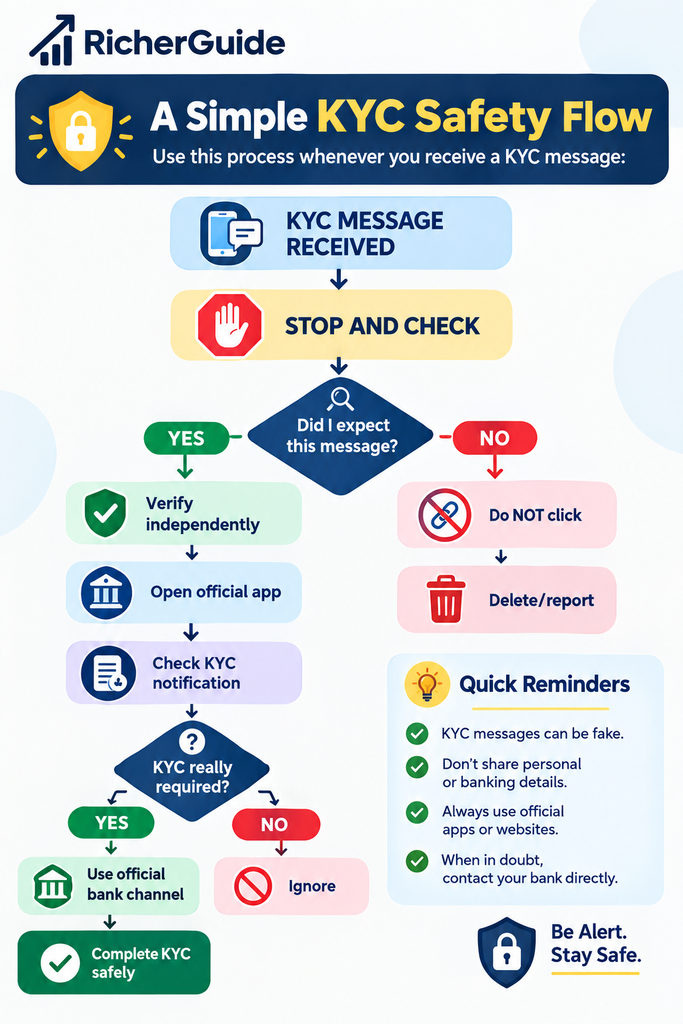
Golden rule:
Do not let a stranger control the process of verifying the stranger.
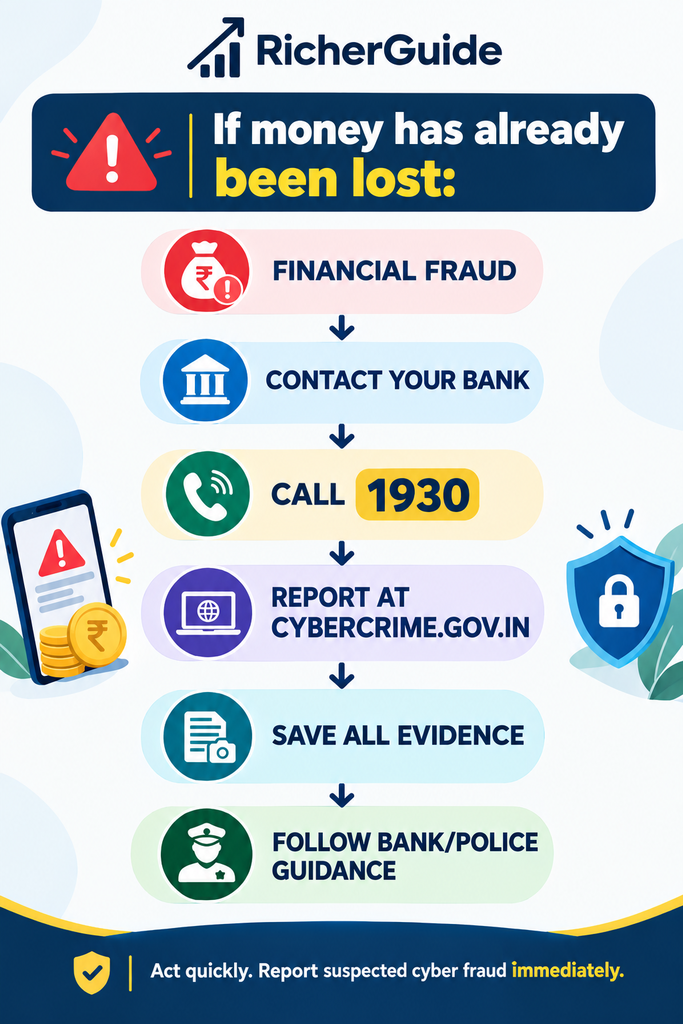
What Should You Do If You Become a Victim?
Do not panic.
Act quickly.
The faster you respond, the more useful your actions may be.
Step 1: Contact your bank immediately
Tell the bank that you suspect fraud.
Ask them what immediate security measures are appropriate for your account, cards and digital banking access.
If card details may have been exposed, ask about blocking or replacing the affected card.
Step 2: If money has been lost, call 1930 immediately
The Government of India’s National Cyber Crime Reporting Portal states that victims of cyber financial fraud can call 1930, which is available 24×7.
Do not wait until the next day.
Step 3: Report the incident online
You can report cybercrime through the official National Cyber Crime Reporting Portal.
National Cyber Crime Reporting Portal
The portal supports reporting of online financial fraud and other cybercrimes.
Step 4: Preserve evidence
Do not immediately delete everything.
Save:
- SMS
- WhatsApp messages
- Phone numbers
- Email messages
- Screenshots
- Website URLs
- Transaction IDs
- UPI IDs
- Bank alerts
- Payment receipts
- App names
- Relevant dates and times
This information can be useful when reporting the incident.
Step 5: Secure your accounts
Depending on what information you shared, consider changing relevant passwords and taking appropriate steps with your bank/payment providers.
If you installed an unknown application, remove it only after considering whether evidence needs to be preserved, and contact your bank/security provider for guidance.
Official Reporting Channels in India
1. National Cyber Crime Reporting Portal
For cybercrime complaints:
For financial cyber fraud, call:
1930
The official portal specifically directs citizens to report cyber financial fraud through 1930 and provides online reporting facilities.
2. Your Bank
Contact your bank immediately if:
- Money has been debited.
- Card information was exposed.
- Internet banking credentials were shared.
- UPI credentials may have been compromised.
- You clicked a suspicious link and entered banking information.
Use the bank’s official contact channel.
3. NPCI / UPI-related complaints
For UPI-related fraud, you should first notify your bank/payment service provider and report the cyber fraud through the official government mechanism.
NPCI provides fraud-awareness information for digital-payment users and highlights risks involving fake links, QR codes, unknown applications and social engineering.
4. Local Police
For emergencies or situations requiring police assistance, contact your local police.
The National Cyber Crime Reporting Portal also states that local police should be contacted in an emergency.
Report Suspicious Identifiers
The National Cyber Crime Reporting Portal also provides a Report Suspect facility.
Citizens can report suspicious:
- Website URLs
- WhatsApp numbers
- Telegram handles
- Phone numbers
- Email IDs
- SMS headers/numbers
- Social media URLs
KYC Scam Loss Calculator
A small scam can become expensive if criminals obtain access to your account.
Use this simple calculation:
Potential Financial Impact
Direct Loss + Unauthorised Transactions + Replacement Costs + Other Expenses = Total Potential Cost
For example:
| Item | Example |
|---|---|
| Unauthorised UPI transaction | ₹5,000 |
| Card transaction | ₹8,000 |
| Other fraudulent debit | ₹2,000 |
| Replacement/incident expenses | ₹500 |
| Potential impact | ₹15,500 |
The point of this calculator is not to predict your exact loss.
It shows why spending a few minutes verifying a KYC message can be much safer than acting in panic.
Simple rule
5 minutes of verification can prevent a potentially expensive mistake.
KYC Scam Prevention Checklist
Save this checklist.
Before responding to a KYC message:
☐ Did I actually expect a KYC request?
☐ Is the message from an official channel?
☐ Did I independently verify it?
☐ Am I being pressured to act immediately?
☐ Is there a suspicious link?
☐ Is someone asking for an OTP?
☐ Is someone asking for my UPI PIN?
☐ Is someone asking for my CVV?
☐ Am I being asked to install an unknown application?
☐ Am I being asked to transfer money?
If you answer YES to any of the last six questions, stop and verify before proceeding.
Genuine KYC vs Fake KYC Scam
| Genuine KYC Process | Possible Scam |
|---|---|
| You verify through an official channel | Random SMS/WhatsApp link |
| You independently access your bank | Caller controls the process |
| No unnecessary sharing of authentication secrets | OTP/PIN requested |
| Clear reason for KYC | Threats and panic |
| Official app/website/branch | Unknown website/app |
| No demand to transfer money to a stranger | “Safe account” transfer request |
| You can independently verify | Caller discourages verification |
Important
A legitimate KYC requirement can exist.
That does not make an unsolicited request automatically legitimate.
Common Mistakes People Make
1: Trusting the bank logo
A scammer can copy a logo.
Better approach: Verify the sender and website independently.
2: Calling the number in the SMS
The number itself may belong to the scammer.
Better approach: Use the bank’s official app, website or verified contact information.
3: Sharing OTP “just once”
One OTP can be enough to authorise an important action.
Better approach: Keep OTPs private.
4: Believing the caller because they know your details
Scammers may already have some information about you.
Better approach: Treat unexpected callers as unverified until independently confirmed.
5: Ignoring small transactions
A small unauthorised transaction can be a warning sign.
Better approach: Report suspicious transactions immediately.
What Parents and Senior Citizens Should Know
Senior citizens can be targeted because scammers often use authority and urgency.
Family members can help by explaining:
“No bank employee needs your OTP or UPI PIN.”
Create a family rule:
If someone calls about KYC, stop the conversation and call the bank independently.
Parents and older family members should also be encouraged to ask another trusted person for help when a financial message creates confusion or urgency.
Frequently Asked Questions
Can a bank ask me to update KYC?
Yes. Banks and other regulated entities can require periodic KYC updation where applicable.
However, you should verify the request through an official channel rather than trusting an unsolicited link or caller.
RBI’s KYC framework includes requirements around advance communication and reminders for periodic KYC updation.
Is every KYC SMS a scam?
No.
Some KYC messages can be genuine.
The important question is whether the message actually came from the legitimate organisation and whether the requested action is appropriate.
Can I update KYC using a link sent by SMS?
Do not click an unexpected link simply because it claims to be from your bank.
Instead, independently open the official banking app or website and check whether an update is required.
Should I share my OTP with bank employees?
You should not share your OTP with a caller who asks for it.
Treat OTPs as confidential authentication information.
Can someone steal money using my PAN details?
PAN information by itself does not necessarily give someone direct access to your bank account.
However, personal information can be valuable to criminals and may be combined with other information for identity fraud or social engineering.
Protect your personal documents and information.
Is a WhatsApp KYC message safe?
Not automatically.
WhatsApp is simply a communication platform. A scammer can use it to impersonate a bank or financial institution.
Verify independently.
What if someone asks me to install an app for KYC?
Be extremely cautious.
Do not install unknown applications because an unsolicited caller instructs you to do so.
What if I have already shared my OTP?
Contact your bank immediately.
If there has been or may have been financial fraud, report it through 1930 and the National Cyber Crime Reporting Portal as quickly as possible.
What if money has already been stolen?
Act immediately.
- Contact your bank.
- Call 1930.
- Report the incident at the National Cyber Crime Reporting Portal.
- Preserve evidence.
- Follow your bank’s instructions.
- Contact local police where appropriate.
The government advises immediate reporting of cyber financial fraud through 1930.
Can I report a suspicious phone number?
Yes.
The National Cyber Crime Reporting Portal provides a facility for reporting suspect identifiers, including phone numbers, website URLs, WhatsApp numbers, Telegram handles, email IDs and other identifiers.
What is the safest way to update KYC?
Use a channel that you independently verify as belonging to your bank or financial institution.
Examples may include:
- Official banking app
- Official bank website
- Bank branch
- Verified customer-care channel
Can scammers use fake bank websites?
Yes.
A fake website can be designed to look very similar to a legitimate website.
Do not rely only on appearance.
Access the official website independently instead of clicking an unsolicited link.
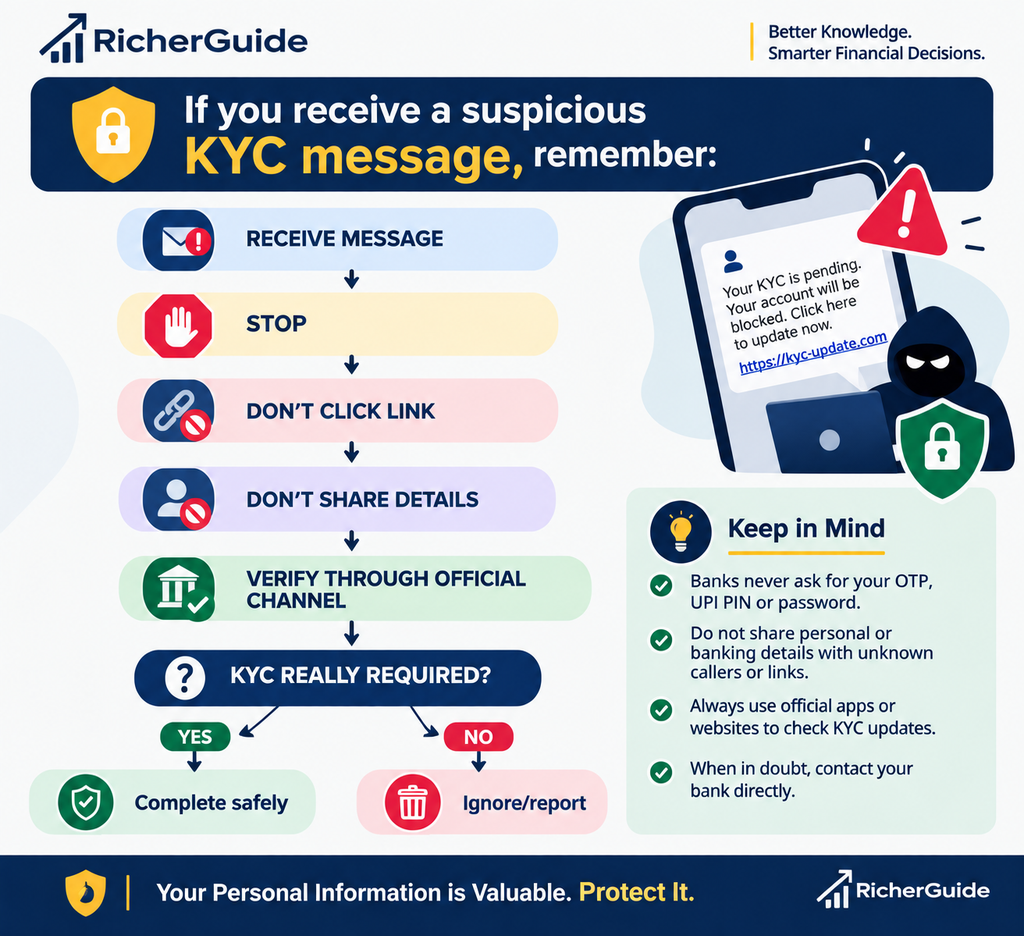
Quick KYC Scam Response Plan
If you receive a suspicious KYC message, remember:
Key Takeaways
Remember these 10 KYC safety rules:
1. KYC itself is not a scam.
Banks may legitimately require KYC updates.
2. Unexpected KYC messages deserve verification.
Do not act automatically.
3. Never share your OTP.
Keep it private.
4. Never share your UPI PIN.
It is used to authorise payments.
5. Never share your CVV or banking password with an unsolicited caller.
6. Don’t click suspicious KYC links.
Open the official banking app or website yourself.
7. Don’t install unknown applications.
Especially when instructed by an unsolicited caller.
8. Don’t transfer money to a “safe account”.
Verify any unusual financial instruction independently.
9. If money is lost, act immediately.
Call 1930 and report the incident.
10. When in doubt, stop.
You are not required to make a financial decision in a hurry simply because a stranger tells you to.
Final Takeaway
KYC is an important part of the financial system, but criminals can misuse the word “KYC” to create fear and urgency.
The most dangerous part of a KYC scam is often not sophisticated technology.
It is social engineering.
A scammer wants you to panic.
They want you to click before thinking.
They want you to share information before verifying.
They want you to believe that you have only a few minutes to act.
You don’t.
Stop. Verify. Then act.
If you receive a KYC message, do not automatically click the link or call the number provided.
Open your bank’s official application or website independently. Contact the bank through a verified channel. Never share OTPs, UPI PINs, passwords or other sensitive authentication information with unsolicited callers.
And if you become a victim of financial cyber fraud, report it immediately through 1930 and the National Cyber Crime Reporting Portal.
Your personal information is valuable. Protect it like your money.
Disclaimer
This article is intended for general financial awareness and educational purposes only. It does not constitute legal, financial, banking, cybersecurity or professional advice. Procedures and requirements may vary between banks, financial institutions and payment providers. Always verify information through the official website, application, branch or customer-care channel of the relevant institution. In case of suspected cyber or financial fraud, contact your bank and the appropriate official authorities immediately. RicherGuide does not guarantee recovery of funds or any particular outcome from a complaint.